
In this guide
Scheduling is the operational backbone of every field service business. It determines how your technicians spend their day, how your customers experience your company, and whether your overhead hours translate into revenue or waste. Yet most service businesses treat scheduling as a clerical task rather than a strategic one.
The difference between a well-run schedule and a chaotic one compounds quickly. A poorly managed schedule means longer drive times between jobs, more missed appointments, higher fuel costs, and customers who stop calling because they got tired of waiting. A well-structured schedule means your team spends more of their day doing billable work, customers get accurate arrival windows, and your dispatcher can handle changes without setting off a chain reaction of phone calls.
This guide covers the fundamentals of field service scheduling -- from basic calendar management through conflict detection, technician assignment, and measuring results. Whether you are running a three-person crew or coordinating dozens of technicians across multiple service areas, the principles are the same.
1. Why scheduling matters
Scheduling is not just about filling calendar slots. It is the system that connects your customers, your technicians, and your office staff. When scheduling works well, everything downstream benefits: dispatch is smoother, time tracking is accurate, invoices go out faster, and customers stay informed.
When scheduling breaks down, the costs are both visible and hidden. Missed appointments and double-bookings are obvious failures. But the subtler costs -- technicians sitting idle between jobs, drive routes that zigzag across town, customers who receive vague four-hour arrival windows -- are harder to measure and easier to ignore. Over months, those inefficiencies add up to significant lost revenue.
The goal of a scheduling system is not to make your dispatcher faster at data entry. It is to give your entire operation -- office, field, and customer -- a single, accurate, real-time picture of who is doing what and when.
Key takeaway
Scheduling is not a clerical task -- it is an operational system. Small improvements in scheduling efficiency compound into measurable gains in technician utilization, customer satisfaction, and revenue per truck.
2. Calendar management basics
A visual calendar is the foundation of any scheduling workflow. At minimum, you need three views: month, week, and day. Each serves a different purpose.
The month view gives your dispatcher a high-level picture of workload distribution. You can see at a glance which days are packed and which have capacity. It is the planning view -- useful for spotting imbalances before they become problems. The week view is the daily coordination view. It shows each technician's schedule side-by-side with time-slot precision, making it easy to compare availability and catch gaps. The day view is for granular scheduling -- managing individual time blocks, adjusting start times, and handling last-minute changes.
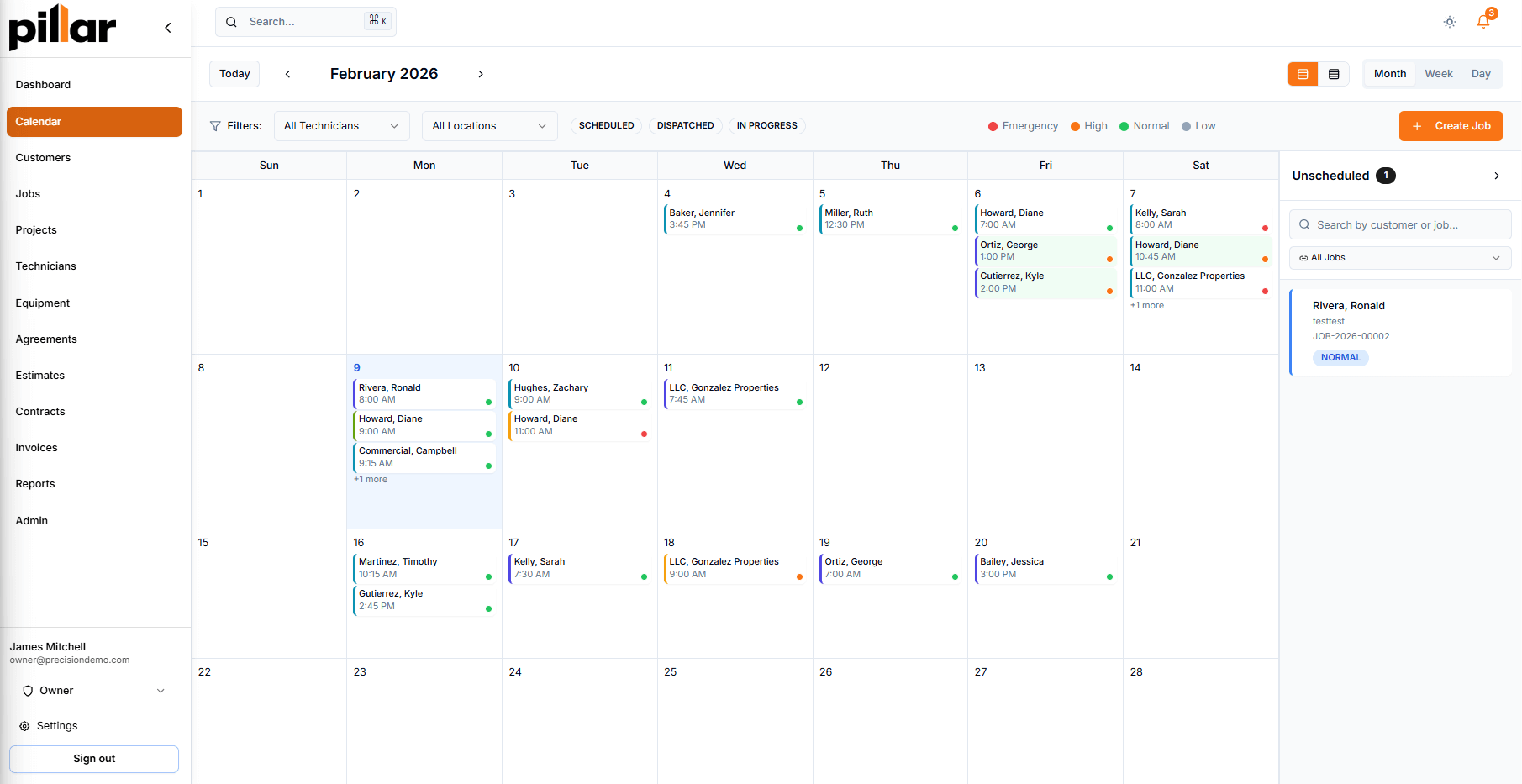
Month view in Pillar — color-coded priorities, technician filtering, and an unscheduled jobs sidebar for drag-and-drop scheduling.
Color-coding is essential at scale. When every technician has a distinct color on the calendar, your dispatcher can visually parse a complex schedule without reading every appointment card. Filtering by technician lets you focus on one person's day when needed, and zoom back out to the full team when planning.
Drag-and-drop rescheduling is the single biggest time-saver in daily scheduling. Instead of opening an appointment, editing the date, saving, and confirming, you drag the appointment to a new time slot. The system checks for conflicts automatically before committing the change. For a dispatcher handling dozens of schedule adjustments per day, this difference is significant.
Key takeaway
Your calendar should do three things well: show the full picture (month), support daily coordination (week), and enable granular adjustments (day). Add color-coding by technician and drag-and-drop rescheduling, and your dispatcher can manage a complex schedule without constant data entry.
See how this works in practice: Pillar Scheduling
3. Conflict detection
Double-bookings are one of the most common scheduling problems in field service. They happen when two people schedule the same technician for overlapping time slots, or when a technician gets assigned a job in a service area they do not cover. The result is always the same: someone finds out about the conflict only when it is too late to fix it cleanly.
A good scheduling system catches conflicts before they happen, not after. There are three types of conflicts to detect:
- Time overlaps. When two appointments for the same technician share any portion of the same time window. This should be flagged the moment the appointment is created or moved, not after saving.
- Location mismatches. When a technician is assigned to a job outside their normal service area. This is not always an error -- sometimes the closest available technician is the right choice -- but the dispatcher should be aware of it before committing.
- Skill requirement gaps. When a job requires specific expertise -- a gas line certification, a certain equipment proficiency -- and the assigned technician lacks that qualification. Skill-based matching prevents callbacks and rework.
The key distinction is between blocking and non-blocking conflicts. A time overlap should prevent the save entirely. A location mismatch should warn the dispatcher but let them proceed with intent. The system should differentiate between "this will cause a problem" and "you should know about this."
Key takeaway
Conflict detection should be automatic and immediate -- not something your dispatcher discovers by scrolling through a spreadsheet. Time overlaps, location mismatches, and skill gaps should surface before the appointment is saved, not after the technician is en route.
4. Multi-visit job scheduling
Not every job is a single visit. Larger projects -- a bathroom remodel, a full HVAC replacement, a multi-day electrical panel upgrade -- require multiple appointments across different days. The challenge is tracking these appointments as parts of a single job, not as unrelated calendar entries.
Multi-visit job scheduling means a single job record can contain multiple appointments, each with its own scheduled time, assigned technician, status, and checklist. "Day 1 - Rough-in" and "Day 2 - Finish Work" live under the same job, sharing the customer information, job notes, and billing context. This is different from creating two separate jobs, which would fragment the history and make it harder to track progress.
When evaluating scheduling software, look for bulk appointment creation. If a job needs four visits, you should be able to define all four at once with individual dates and technician assignments, rather than creating them one at a time. Each appointment should track its own status independently -- one visit can be completed while another is still scheduled.
Key takeaway
Multi-visit jobs should stay unified under a single job record with individual appointments that each have their own status, technician, and checklist. Bulk creation saves time when planning multi-day work.
5. Technician assignment
Assigning the right technician to each job is about more than just checking who is available. Three factors determine a good match: skills, availability, and territory.
Skills. Every technician has a different set of qualifications. Some carry gas line certifications. Others specialize in commercial electrical work. A good scheduling system tracks these skills per technician and validates them against job requirements before assignment. Skill proficiency levels -- from basic through expert -- add nuance beyond simple yes-or-no certification checks.
Availability. Beyond time slot availability, consider work schedules and time-off requests. A technician who is technically free at 3 PM but whose shift ends at 4 PM is not a good fit for a two-hour job. Weekly work schedules, vacation time, sick leave, and training days should all feed into the availability calculation.
Territory. Assigning technicians to defined service locations reduces drive time and ensures familiarity with the area. When a technician is assigned to a job outside their normal territory, the dispatcher should see a clear notification -- not a silent error that shows up as an extra forty-five minutes of drive time on the timesheet.
For jobs that need more than one person on site, multi-technician assignment with a designated lead keeps accountability clear. The lead technician owns the job outcome while additional technicians are assigned to assist. Each person shows up on the calendar independently, so workload tracking stays accurate.
Key takeaway
Good technician assignment considers skills, real availability (including work schedules and time off), and service territory. A recommendation engine that factors in all three saves your dispatcher from mentally juggling these variables on every job.
Learn more about technician management: Technicians in Pillar
6. Recurring job automation
Maintenance contracts and repeat services are the foundation of predictable revenue in field service. Quarterly HVAC tune-ups, monthly landscape maintenance, bi-weekly pool cleaning -- these jobs need to appear on the schedule automatically, without someone remembering to create them each cycle.
Rule-based recurrence scheduling defines the pattern once and lets the system handle the rest. Daily, weekly, or monthly frequencies with configurable intervals cover most use cases. An HVAC company might set "every 6 months" for a preventive maintenance contract. A cleaning company might use "every Tuesday and Thursday" for a commercial client. The system tracks the next occurrence and creates the job when it comes due.
The practical value of automation here is twofold. First, it eliminates the risk of missed visits -- the system creates the job whether or not anyone remembers to check. Second, it ties recurring jobs to service agreements, so billing stays aligned with delivery. When the agreement is active, jobs generate. When it is paused or cancelled, they stop.
Look for systems that allow default settings on recurring jobs: default technician, default location, default duration, and default checklist. This means the generated job is ready to dispatch with minimal adjustment, rather than requiring manual setup each time.
Key takeaway
Recurring job automation turns maintenance contracts into reliable revenue. Define the pattern once -- frequency, assigned technician, checklist, billing link -- and let the system handle creation. No missed visits, no manual entry.
See how Pillar handles this: Recurring Jobs
7. Customer communication
Scheduling does not end when the appointment is on the calendar. Your customer needs to know when to expect the technician, and they need a way to request changes without calling your office.
Automated reminders. SMS and email reminders reduce no-shows and last-minute cancellations. A reminder the day before the appointment, and another when the technician is en route, keeps the customer informed without your office staff making individual phone calls. The system should track whether reminders have been sent to prevent duplicates.
Self-service rescheduling. Customers cancel and reschedule for legitimate reasons -- schedule conflicts, emergencies, weather. Giving them a way to request a reschedule through a customer portal, rather than requiring a phone call, reduces the load on your office team and gives customers a better experience. The request goes to your dispatcher for review, so you maintain control over the final schedule.
Reschedule request management. When a customer submits a reschedule request, they should be able to provide a reason and suggest preferred alternative dates. Your dispatcher reviews the request, checks availability, and approves or denies it -- all from a single management view. This workflow is more structured than a phone call and creates a clear record of what happened and why.
Key takeaway
Communication should be built into the scheduling workflow, not bolted on. Automated reminders reduce no-shows. Self-service rescheduling via a customer portal reduces phone volume and gives customers agency without sacrificing your control over the schedule.
Related features: Notifications and Reschedule Requests
8. Measuring scheduling efficiency
You cannot improve what you do not measure. Scheduling efficiency has three core metrics worth tracking.
Technician utilization rate. What percentage of a technician's working hours are spent on billable jobs versus travel, admin, or idle time? Time tracking with entry types -- job work, travel, admin, training, break -- gives you the data to calculate this. A utilization rate is not about squeezing every minute out of your team. It is about understanding where time goes so you can make informed decisions about staffing and scheduling.
Drive time. How much time do your technicians spend driving between jobs? Route planning and territory-based scheduling directly reduce this number. Tracking estimated versus actual drive time per job helps you calibrate scheduling windows and identify routes that consistently run long.
On-time percentage and labor variance. How often do technicians arrive within the scheduled window? And how does the actual time spent on a job compare to the estimate? Labor variance -- the gap between estimated and actual hours -- tells you whether your scheduling durations are realistic. If a particular job type consistently runs 30 percent over estimate, the fix is not faster technicians. It is a more accurate estimate.
Profitability reporting ties it all together. When you know the labor cost per job (hours worked multiplied by hourly rate), the material cost, and the revenue, you can see which jobs are profitable and which are not. That data feeds back into scheduling decisions: which jobs to prioritize, which to price differently, and where to invest in training.
Key takeaway
Track three things: technician utilization, drive time, and labor variance. These metrics tell you whether your schedule is working as an operational system or just as a list of appointments. Profitability reporting connects scheduling decisions to financial outcomes.
Putting it together
Field service scheduling is not a single tool or feature. It is a workflow that connects calendar management, conflict detection, technician assignment, recurring automation, customer communication, and performance measurement. Each piece reinforces the others.
A visual calendar with drag-and-drop rescheduling saves time on every schedule change. Automatic conflict detection prevents mistakes that cost hours to fix. Skill-based technician assignment reduces callbacks. Recurring job automation protects revenue. Customer self-service reduces office phone volume. And utilization metrics tell you whether the whole system is working.
If your current scheduling process depends on spreadsheets, whiteboards, or manual coordination, the gap between where you are and where you could be is likely larger than you think. The operational gains from proper scheduling software are not marginal -- they are structural.
To see how these concepts work inside a complete field service platform, take a look at Pillar's scheduling features or request a demo to walk through the system with your own job types and team size.