Built for electrical contractors
Panel upgrades, rewires, inspections, and service calls -- Pillar handles the scheduling, permits, and paperwork so your team stays focused on the work.
Running an electrical business means managing more than wires
Between permit requirements, multi-day panel upgrades, inspection callbacks, and keeping certifications current, the operational overhead adds up fast. Pillar handles the logistics.
Multi-day jobs need coordination
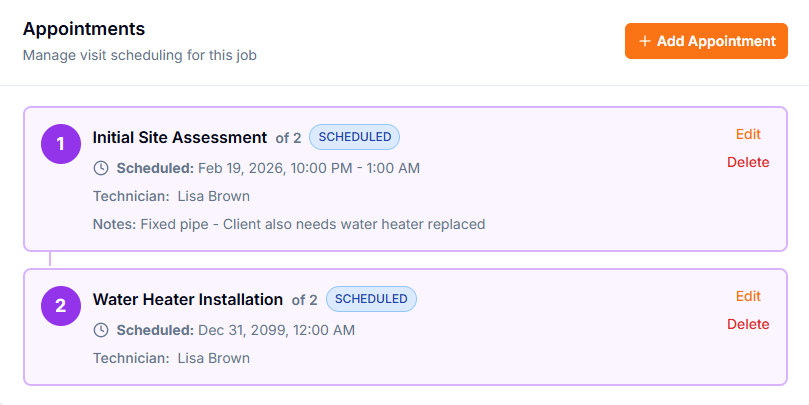
A 200A panel upgrade is not a one-visit job. Between rough-in, inspection, and final hookup, you need a system that tracks each visit separately within the same work order.
Certifications expire without warning
Electrician licenses and certifications have expiration dates. Sending an unlicensed technician to a job creates liability. You need visibility before it becomes a problem.
Inspection callbacks disrupt the schedule
When an inspection fails, the callback needs to be scheduled quickly without double-booking your team. Conflict detection and drag-and-drop rescheduling make this manageable.
Tools that match how electrical work actually flows
From the initial service call through final inspection, every step has a place in the system.
Multi-Visit Jobs
Create a single job with multiple appointments -- rough-in, inspection, final connection. Each visit has its own status, technician, and checklist.
Drag-and-Drop Scheduling
Move appointments between days and time slots by dragging. Conflict detection flags overlaps before you save.
Equipment Categories
Built-in categories for electrical panels, generators, and EV chargers. Track manufacturer, model, serial number, and warranty per unit.
Estimates with E-Signature
Send professional estimates from your price book. Customers approve via a secure link with electronic signature -- no login required.
Technician Skill Levels
Track skill proficiency from Basic through Expert. The system recommends technicians based on skills and availability for each job.
Mobile-Ready (PWA)
Technicians access jobs, checklists, and customer details from any device. Installable with offline caching -- no app store needed.
A panel upgrade, start to finish
Here is how a typical multi-day electrical job moves through Pillar -- from the customer call to the final sign-off.
Customer calls about a panel upgrade
IntakeCreate the customer record (or pull up their existing profile), log the initial service request, and build an estimate from your price book with line items for materials and labor.
Customer approves the estimate
ApprovalThe customer receives a secure approval link, reviews the scope and pricing, and signs electronically. The approved estimate converts into a job with one click.
Schedule the multi-visit job
SchedulingCreate multiple appointments within the job -- Day 1 for rough-in, Day 2 for inspection, Day 3 for final hookup. Assign technicians and attach checklists to each visit.
Technician completes the work
FieldEach technician opens the appointment on their phone, follows the checklist, marks items complete, and uploads required photos. Time entries are recorded at clock-in and clock-out.
Invoice and collect payment
BillingGenerate the invoice from the completed job, apply any discount codes, and send it to the customer. They pay online through Stripe or via the customer portal.
Every panel, generator, and charger on record
Track installed electrical equipment with manufacturer, model, serial number, and warranty status. When a customer calls about a panel they had installed two years ago, your team has the full history immediately.
Warranty Tracking
Dashboard alerts before warranties expire so you can proactively reach out
Service History per Unit
Full record of every inspection, repair, and maintenance visit on each piece of equipment
Auto-Create from Jobs
Price book items can automatically generate equipment records when a job is completed
Visible in Customer Portal
Customers see their installed equipment and warranty status in their self-service portal
Equipment on File
Square D QO 200A Panel
SQD-2025-QO200
Generac 22kW Generator
GEN-2024-22KW
ChargePoint Home Flex EVSE
CPH-2023-FLEX
Siemens 100A Sub-Panel
SIE-2020-100A
Licenses, skills, and certifications tracked per technician
Electrical work requires licensed professionals. Pillar tracks license numbers, expiration dates, skill levels, and certifications for every technician on your team.
License Numbers
Store license number and expiration date for each technician
Skill Proficiency
Four levels: Basic, Intermediate, Advanced, Expert
Certification Dates
Track certifications with expiration for proactive renewal
Skill-Based Assignment
System recommends qualified technicians for each job type
Inspection checklists your team actually completes
Attach step-by-step checklists to every appointment. Flag items that require photo documentation. Dispatchers see completion progress without calling the field.
Reusable appointment templates
Define standard checklists for common jobs like panel upgrades, EV charger installs, or whole-house rewires. Attach them to appointments automatically.
Photo documentation
Flag checklist items that require photo evidence. Before-and-after shots become part of the job record.
Real-time progress visibility
Dispatchers see which checklist steps are done without calling. Comments on individual items keep everyone aligned.
200A Panel Upgrade Checklist
4 of 7 completeExplore the full platform
These features work together to give electrical contractors a single system for their entire operation.
Jobs & Work Orders
Multi-visit jobs with status tracking
Scheduling
Drag-and-drop calendar with conflict detection
Estimates
Professional quotes with e-signature approval
Technicians
Skills, certifications, and availability
Equipment
Panels, generators, and warranty tracking
Invoicing & Payments
Stripe-powered invoicing with online payment
Customer Portal
Self-service for approvals and payments
Analytics
Job profitability and labor variance reports
See how Pillar works for electrical contractors
Schedule a demo and we will walk through the platform with your job types, team size, and service area in mind. No generic pitch.