
Every field service business prices its work somehow. Maybe it is a number in the owner's head. Maybe it is a spreadsheet that the office manager updates when she remembers. Maybe it is whatever the technician thinks sounds fair when the customer asks “how much?” on-site.
These approaches work until they do not. The moment you have more than one person quoting jobs, you need a single source of truth for what your services cost. That source of truth is a price book.
This guide walks through how to build one from scratch -- from organizing your services into categories, to setting base costs and markups, to connecting your price book to estimates and invoices so every quote that leaves your office is accurate and consistent.
What is a price book?
A price book is a centralized catalog of every service and product your company offers, with standardized pricing attached to each item. Think of it as a menu for your business. Instead of each technician making up prices on the fly, everyone references the same list.
Each entry in a price book typically includes a name, a description, a unique item code, a base cost (what it costs you), and a list price (what you charge the customer). Some entries also include expected duration -- useful for scheduling -- and links to the skills or equipment needed to perform the service.
A well-built price book does not just list prices. It becomes the backbone of your quoting, invoicing, and scheduling workflows. When a dispatcher creates an estimate, she pulls line items from the price book. When a technician builds a quote on-site, he browses the catalog on his phone. When the job is done, the invoice line items already match what was quoted because they came from the same source.
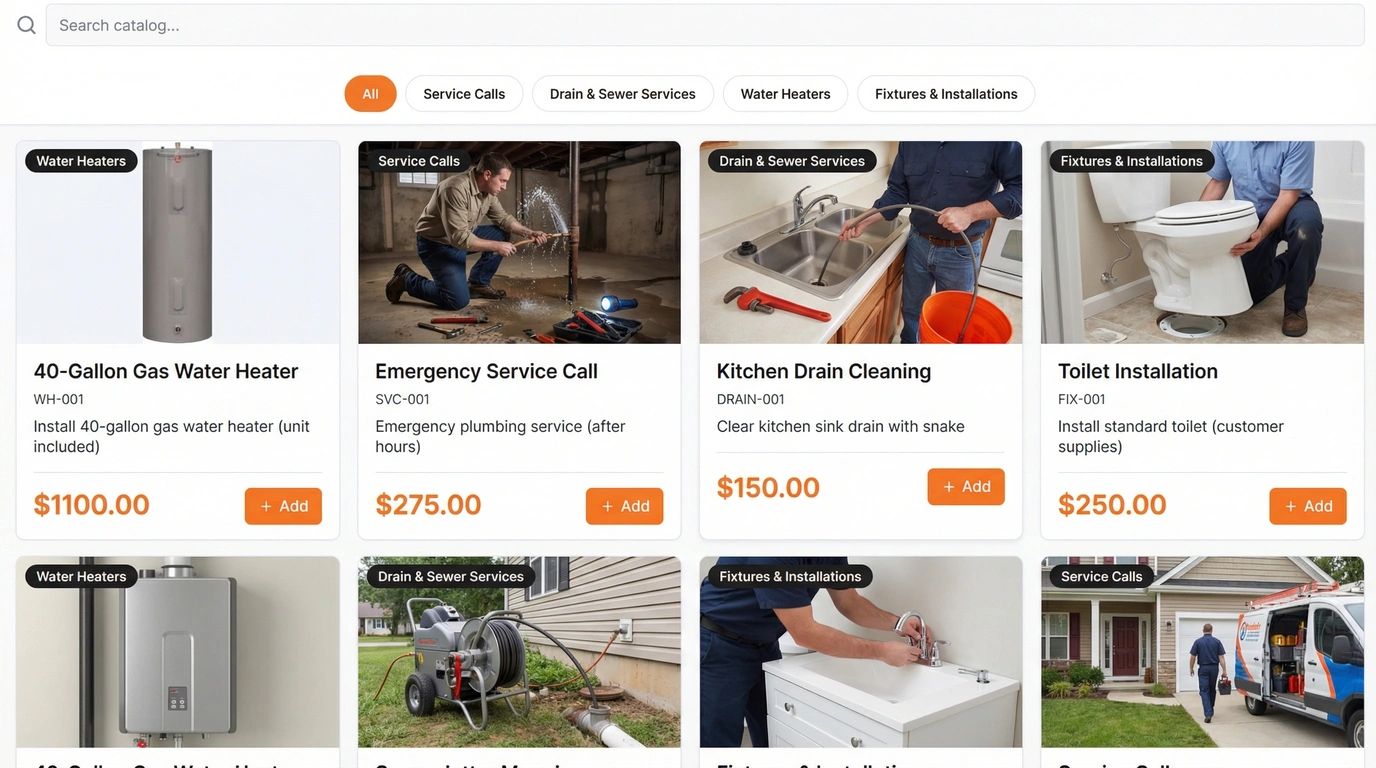
Pillar's price book catalog — browse by category, see item photos, base costs, and list prices at a glance.
Why you need one
Without a price book, pricing becomes a game of telephone. The owner sets a target margin. The office relays it to the field. The technician adjusts based on what they think the customer can afford. By the time the invoice is generated, nobody is sure whether the job was actually profitable.
A price book solves this in four ways.
- Consistent pricing across technicians. Whether your most experienced tech or your newest hire is quoting the job, the customer gets the same price. No more explaining why the same service cost $200 last time and $280 this time.
- Faster quoting. Instead of calculating every estimate from scratch, your team selects items from a pre-built catalog. Descriptions, prices, and durations are already filled in. A quote that used to take 20 minutes takes 2.
- Accurate estimates. When prices are centrally managed, there is no risk of quoting an outdated rate or forgetting to include materials. The price book reflects your current costs and margins.
- No more guessing. New hires do not need to ask the owner what to charge. Seasonal price adjustments happen in one place and apply everywhere. Your pricing stops being tribal knowledge and becomes a documented business asset.
Organizing with categories
A flat list of 200 services is not a price book -- it is a headache. The key to a usable catalog is hierarchical categories that mirror the way your team actually thinks about their work.
Start with broad service areas as your top-level categories. Under each, create subcategories for specific service types. You can nest categories up to four levels deep, which is enough to cover even the most specialized operations.
Example: Plumbing price book hierarchy
Plumbing
Drain Services
Drain Cleaning (Standard)
Drain Cleaning (Camera Inspection)
Drain Line Replacement
Water Heaters
Tank Water Heater Install
Tankless Water Heater Install
Water Heater Repair
Fixtures
Faucet Install
Toilet Install
Garbage Disposal Install
Each category can have its own icon, color, and display order, so your team can navigate the catalog quickly even on a mobile device. Categories also apply to equipment -- if your price book item for “Tankless Water Heater Install” auto-creates an equipment record when the job is completed, that equipment inherits the right category automatically.
Tip: Keep categories stable
Resist the urge to reorganize categories frequently. Your team builds muscle memory around the structure. Add new subcategories as needed, but avoid moving items between top-level categories unless you are correcting a clear mistake.
Setting prices
Every price book item has two key numbers: the base cost and the list price. Understanding the difference is important.
The base cost is what the service costs you to deliver. It includes your labor (hourly rate multiplied by expected hours), the materials you use, and any direct expenses like equipment rental or disposal fees. This is your floor -- pricing below this number means you are losing money on the job.
The list price is what you charge the customer. The gap between base cost and list price is your margin. How you calculate that margin depends on your pricing strategy, but most service businesses use one of two approaches:
- Flat markup. Add a fixed dollar amount on top of your base cost. Simple to calculate and easy for customers to understand. Common for standardized services like drain cleaning or filter replacement where your costs are predictable.
- Percentage markup. Add a percentage on top of your base cost. Better for services where material costs vary widely, like equipment installations. A 40% markup on a $500 water heater gives you $200, while the same markup on a $2,000 unit gives you $800 -- scaling your margin with the complexity of the job.
Beyond pricing, each item should include an expected duration in hours. This serves double duty: it feeds into your labor cost calculations, and it determines how much calendar time to block when the service is scheduled. A price book item with a 2-hour duration creates a 2-hour appointment slot automatically.
Dynamic pricing formulas
Manually updating hundreds of prices every time your material costs change or your labor rates go up is tedious and error-prone. This is where pricing formulas come in.
A pricing formula defines how a price is calculated from its component parts. Instead of hardcoding “$350” as the list price, you define a formula that says: take the base cost, add the material cost, add labor hours times the hourly rate, then apply a markup percentage. The system calculates the final price automatically.
Five formula components are available:
Base Cost
Fixed cost of delivering the service
Product Cost
Cost of products or parts used
Material Cost
Cost of raw materials consumed
Labor Hours
Expected labor time at your hourly rate
Markup %
Percentage added to the total cost
The real power of formulas is the cascade. You can set a default formula for your entire company. When you change a component value -- say your material supplier raises prices by 5% -- every price book item using that formula recalculates automatically. Hundreds of prices updated in seconds, with a full audit trail showing what changed, by how much, and who triggered the update.
Cascade with control
Not every item should follow the default formula. Items with negotiated pricing or promotional rates can be excluded from cascade updates, so a global formula change does not accidentally override a special deal. If a cascade produces unexpected results, you can roll it back.
Pricing formulas and the cost cascade are included on every Pillar account, at no extra charge. Learn more about the price book.
Price options: Good, Better, Best
Offering a single price for every service leaves money on the table. Customers who want premium service have no way to get it. Customers who want something basic feel forced into a package that is more than they need. The result: you either undersell or lose the job entirely.
Price book items can have multiple option tiers -- typically structured as Good, Better, and Best. Each tier adjusts the base price using one of three methods:
- Fixed adjustment. Add or subtract a flat dollar amount. “Basic drain cleaning is $150. Premium with camera inspection is $150 + $75 = $225.”
- Percentage adjustment. Increase or decrease by a percentage of the base price. “The upgraded option is 30% more than standard.”
- Markup adjustment. Apply a markup that factors in your cost structure differently for each tier.
Each option can include its own feature highlights -- a list of what is included at that tier. When a technician presents the options to a customer on-site, the customer sees exactly what they are getting at each price point. You can flag one option as recommended to guide the conversation without pressuring anyone.
Example: HVAC tune-up options
Good -- Basic Tune-Up
Filter replacement, visual inspection
$129
Better -- Full Tune-UpRecommended
Filter, coil cleaning, refrigerant check, electrical test
$189
Best -- Premium Tune-Up
Everything in Full, plus duct inspection and UV light install
$329
Connecting to estimates and invoices
A price book that exists in isolation is just a reference document. The value comes from connecting it to the rest of your workflow -- estimates, invoices, and scheduling.
When your team creates an estimate, they should be pulling line items directly from the price book. The item description, unit price, and duration come pre-populated. The estimator adjusts quantities, adds notes, and sends the quote. No manual price lookups, no transcription errors, no outdated rates.
Once the customer approves the estimate, it converts into a job. The line item durations determine how long the appointments need to be. If an estimate includes a 2-hour water heater install and a 30-minute inspection, the system knows to block 2.5 hours on the calendar.
When the job is complete, generating an invoice is a matter of pulling the same line items forward. The customer sees a consistent paper trail: the quote they approved matches the invoice they receive. No surprises, no disputes over what was agreed.
The price book workflow
Price Book
Items & prices
Estimate
Quote sent
Job
Work scheduled
Invoice
Payment collected
Technicians can also browse the price book from their mobile device when building quotes on-site. They select items, adjust quantities, and present the options to the customer -- all without calling the office. See how estimates work in Pillar.
Keeping your price book current
A price book is not a set-it-and-forget-it document. Material costs change. Labor rates increase. New services get added. Old ones get retired. If your price book does not keep up, your margins erode quietly -- you are still quoting last year's prices while paying this year's costs.
Set a regular review cadence. Most service businesses review their price book quarterly, with an additional review whenever a major cost input changes (e.g., a supplier raises prices or you adjust hourly rates).
If you are using pricing formulas, bulk updates become straightforward. Change the material cost component in your formula, and every linked item recalculates. The system logs the change with a full audit trail: what changed, who made the change, how many items were affected, and the total price impact across your catalog. If an update produces unexpected results, you can review the audit log and roll back the change.
Audit trail matters
Every price change is logged with the change type, component affected, old and new values, the number of items recalculated, and who triggered the update. Four change types are tracked: global value updates, bulk recalculations, formula assignments, and manual overrides. This gives you a complete history of how your pricing has evolved over time -- useful when reviewing margins and when explaining pricing to customers or partners.
Beyond pricing, review your categories periodically. As your business adds services, you may need new subcategories. Items that are no longer offered can be deactivated rather than deleted, so historical estimates and invoices still reference them correctly.
Start with what you have
You do not need to catalog every service on day one. Start with your 10 or 20 most common services. Get the categories right, set accurate base costs and list prices, and connect them to your estimating workflow. You can expand from there.
The goal is not perfection -- it is consistency. A price book with 20 well-structured items is more useful than a spreadsheet with 200 rows that nobody trusts.
If you want to see how all of this works in practice, explore Pillar's price book features or request a demo and bring your own service list. We will walk through setting up your catalog, applying pricing formulas, and connecting it all to your estimating and invoicing workflows.