Appliance repair software built around the two-visit repair
Visit one finds the problem. Visit two installs the part. Pillar keeps both on one job — with the diagnostic fee collected up front, the appliance's history on file, and the part tracked from purchase order to truck.
The problems appliance repair shops know too well
Most repairs are not one visit. The gap between the diagnosis and the install is where jobs stall, fees go uncollected, and parts go missing.
The second visit gets lost
The diagnosis went fine, the part came in, and the install never got scheduled. When visit two lives on a sticky note, customers wait and jobs stall.
"Is it still under warranty?"
A compressor fails ten months after the install. Whether that visit is billable depends on a date nobody can find quickly.
Service-call fees that never get collected
The customer declines the repair, the technician feels awkward asking, and the diagnostic visit quietly becomes free work.
Parts in limbo
A part is on order — somewhere. Which vendor, which job it belongs to, and which truck it should land on lives in text threads.
Prices that depend on the technician
Two techs quote the same control board swap at two different prices. Without a flat-rate book, every quote is an improvisation.
"Any update on my part?"
Every customer who calls to ask about their repair, their invoice, or their next visit pulls the office off real work.
Diagnose Tuesday, install Friday — one job
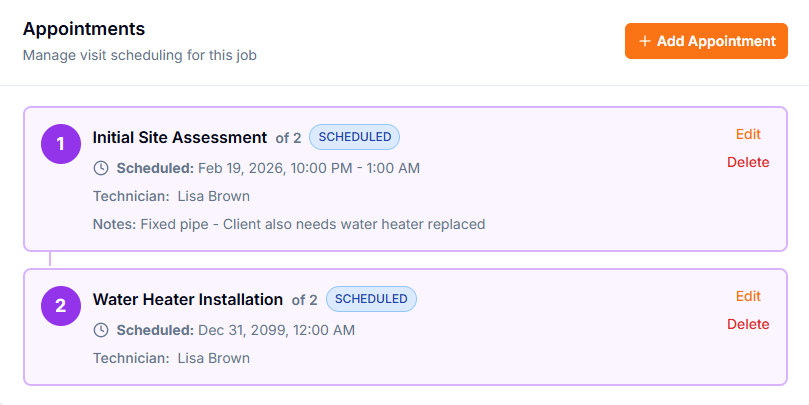
Most software treats the return visit as a brand-new ticket, and the context gets lost in between. In Pillar, a job holds multiple appointments: the diagnosis is visit one, the install is visit two, and everything in between stays on the same record.
Multiple visits on one record
A job holds as many appointments as the repair needs. Visit one is the diagnosis, visit two is the install — numbered in sequence on the same job.
Each visit has its own schedule and status
Appointments carry their own date, technician, and status from scheduled through completed — so the install can wait for the part without losing its place.
Context follows the job
Notes, photos, and the diagnostic checklist stay on the job. If a different technician runs the install, they see what visit one found before they knock.
Nothing waits in someone’s head
Unscheduled visits stay on a visible list until they are on the calendar. The part arriving becomes a scheduling action, not a memory test.
Deposit Request
Service Call FeeJob
Washer not draining — diagnostic visit
Fee requested
$89.00
Status
Paid online — visit confirmed on the calendar
Collect the service-call fee before the truck leaves
Appliance repair runs on diagnostic fees — and they are the easiest money to lose. Pillar turns a phoned-in fee into a deposit with a Stripe payment link, sent before the visit is ever dispatched.
A payment link, not a promise
The fee becomes a deposit on the job with a Stripe checkout link. The customer pays from their phone before the visit happens.
Email on every plan, text on Enterprise
Payment links go out by branded email on all plans. On the Enterprise plan with SMS configured, they go out by text as well.
Marked paid automatically
When the customer pays, the deposit flips to paid in Pillar and the office is notified — no reconciling screenshots against the bank account.
Defaults per visit type
Set a default service-call fee on the appointment template and the request comes pre-filled, so dispatchers never re-type it on a busy morning.
Appliance repair business software that covers the whole shop
Scheduling, appliance records, parts, and billing in one system — so the office and the field work from the same record.
A record for every appliance
Each unit is an equipment record: manufacturer, model, serial number, install date, and warranty expiration. A household with six appliances is six tracked units under one customer.
Warranty answers in seconds
Warranty dates live on the record, and the dashboard alerts you before coverage runs out. Know whether the visit is billable before you quote it.
Flat-rate price book
Catalog repairs by appliance type with set prices. The same repair quotes at the same price whichever technician is standing in the kitchen, and overrides are tracked with a reason.
Parts, truck stock, and purchase orders
Track inventory across the warehouse and every truck, send purchase orders to vendors for the part that has to be ordered, and stock deducts when a part is used on a job.
Diagnostic checklists with photo proof
Build a checklist per visit type and require photos on key steps — the nameplate, the failed component, the finished install. Comments per step keep findings on the record.
Estimates approved online
Present repair and replacement options side by side. Customers approve with an e-signature from a secure link — no account and no login required.
Six appliances, one customer, zero guesswork
Appliance repair is a per-unit business. The customer is one record, but the wall oven and the dryer have separate histories. Pillar tracks each appliance as its own equipment record — so when the compressor fails ten months after the install, the warranty answer is on the screen, not in a filing cabinet.
Per-unit detail
Manufacturer, model, serial number, install date, and notes on every unit you service.
Service history per unit
Every visit logged against the appliance — work performed, parts used, issues found, recommendations.
Warranty expiration alerts
Warranty dates with dashboard alerts before coverage runs out.
Auto-created from the price book
Selling an installation can create the equipment record automatically when the job completes.
How appliance repair companies use Pillar
From the first call to the installed part, every step stays on one record.
Book the diagnostic
Take the call, create the job, and send the service-call fee as a payment link by email or text. The fee is collected before the visit.
Diagnose and document
The technician works the diagnostic checklist, photographs the nameplate and the fault, and the findings land on the job and the appliance’s history.
Quote repair or replace
Build the estimate from the flat-rate price book with options side by side. The customer signs on the tech’s phone or approves later from a link.
Order the part, book visit two
Send the purchase order, schedule the install as the second appointment on the same job, and invoice when the work is done — paid online.
Two numbers at the kitchen table: fix it or replace it
When a ten-year-old dryer needs an expensive repair, the customer wants the comparison, not a sales pitch. The price book lets your technician present repair and replacement options side by side from their phone — and capture the decision on the spot.
Options side by side
Price book items carry tiered options with feature highlights and a recommended flag — repair versus replace is one screen, not two follow-up calls.
Flat-rate, not improvised
Repairs price from the catalog. When a price is overridden, the override is tracked with a reason.
Signature on the glass
On-site signature capture on the technician’s phone turns a yes into an approved estimate before they leave the house.
Approval from home
Not ready to decide? The estimate goes out as a secure link the customer can approve later with an e-signature — no login required.
Explore the features behind it
Every appliance repair workflow connects to the broader Pillar platform. Dig into the features that matter most to your business.
Equipment Tracking
Per-appliance records with warranties and history
Estimates & Quoting
Repair-or-replace options with online approval
Invoicing & Payments
Online payments and configurable terms
Scheduling
Drag-and-drop calendar with conflict detection
Price Book
Flat-rate catalog with tiered options
Customer Portal
Self-service dashboard for your customers
Jobs & Work Orders
Multi-visit jobs with checklists and photos
Technicians
Skills, schedules, and team management
Frequently asked questions
- Can the diagnosis and the repair be separate visits on one job?
- Yes. A Pillar job holds multiple appointments, each with its own date, technician, and status. Visit one is the diagnostic, visit two is the install, and they share one job record — the notes, photos, and checklist from the first visit are in front of whoever runs the second. The install can stay unscheduled until the part arrives, visible on the unscheduled list instead of forgotten.
- Can I collect a diagnostic or service-call fee before the visit?
- Yes. A deposit request turns the fee into a Stripe payment link the customer pays from their phone. Links go out by branded email on every plan, and by text message on the Enterprise plan where SMS is configured. When the customer pays, the deposit is marked paid in Pillar automatically, and appointment templates can carry a default fee so dispatchers never re-type it.
- How does Pillar track individual appliances?
- Every appliance becomes an equipment record under the customer: manufacturer, model, serial number, install date, warranty expiration, and a per-unit service history showing each visit, the work performed, and the parts used. The dashboard alerts you before warranties expire, and customers can see their own units and history in the portal.
- Does Pillar include model-number lookups or a fault-code database?
- No. Pillar is field service management software — scheduling, job records, estimates, invoicing, inventory, and customer history. It does not include a manufacturer parts catalog, fault-code lookups, or per-model diagnostic data, so your technicians keep using their existing technical references. Pillar keeps the business side — who, what, when, for how much, and under what warranty — on one record.
- How much does appliance repair software cost?
- Pillar Pro is $99/month and Enterprise is $199/month, each including one user, with additional users at $49 and $69 per month respectively. Annual billing saves roughly 20%. Every new account starts with a 14-day free trial of the Enterprise plan, and there are no setup fees or long-term contracts.
Everything an appliance repair business runs on
Jobs & Work Orders
Diagnosis and repair as two visits on one job.
Learn moreEquipment Tracking
Every appliance with brand, model, serial, and warranty.
Learn moreEstimates & Quoting
Repair-vs-replace options customers sign online.
Learn morePrice Book
Flat-rate repair pricing by appliance type.
Learn moreInvoicing & Payments
Collect the diagnostic fee and final payment online.
Learn moreScheduling & Dispatch
Tight arrival windows without double-booking.
Learn moreCustomer Portal
Customers track visits and pay without phone calls.
Learn morePillar vs Housecall Pro
See how Pillar compares for appliance repair.
Learn moreSee how Pillar works for appliance repair companies
Walk through a two-visit repair end to end — the diagnostic fee, the appliance record, the repair-or-replace estimate, and the install on the same job. No generic demo — your workflow on the screen.