Garage door software that remembers every door you’ve worked on
Same-day repair calls, repair-or-replace estimates, and an equipment record for every door and opener — manufacturer, model, serial, install date, and warranty status. Built for residential and commercial garage door companies.
The problems garage door companies know too well
A garage door business runs on urgent calls and long-lived hardware. When the records live on paper and in one technician’s head, both suffer.
"Is this spring on us?"
When a spring breaks months after an install, the warranty answer lives in a filing cabinet, an old invoice, or nowhere. Guessing costs money either way.
Same-day calls outrun the whiteboard
A broken spring means a car stuck in the garage — the customer wants today, not Thursday. Fitting urgent calls into a day you cannot see clearly invites double-booking.
The quote that never gets sent
The tech quotes a spring repair on site, the customer asks what a new opener would run, and the "formal quote" gets promised for later. Later often never comes.
Nobody knows what is on the truck
Springs, rollers, remotes, and openers get loaded and used with no running count. The tech arrives for a torsion spring job without the right size on board.
Service-call fees are awkward to collect
Asking for a fee over the phone with no way to take payment means eating no-shows — or chasing the money after the visit.
Commercial doors slip through the cracks
Quarterly maintenance on a warehouse with twelve doors lives in someone’s head. A missed visit puts the whole account at risk.
Know what’s on the wall before the visit
Every door and opener you install or service becomes an equipment record on the customer — manufacturer, model, serial number, install date, and warranty expiration. When a spring breaks eight months after the install, “is this on us?” is answered by the record, not a filing cabinet.
The full unit, on file
Door and opener each tracked as their own record — manufacturer, model, serial number, install date, and notes.
Warranty answers in seconds
Warranty expiration on every record, with dashboard alerts before coverage runs out. Warranty calls start with facts, not guesses.
Service history per unit
Every repair, tune-up, and inspection logged against the unit — what was done, by whom, and what was found.
Created automatically on install
Price book items can create the equipment record when the install job completes — model and warranty captured at the job, kept on the customer.
Equipment Record
Under WarrantySectional door — wall-mount opener
- Manufacturer
- Apex Door Co.
- Model
- WD-850
- Serial Number
- APX-44721-B
- Installed
- Mar 14, 2025
- Warranty Until
- Mar 14, 2028
- Category
- Opener
Service History
From “the door won’t open” to a tech on site
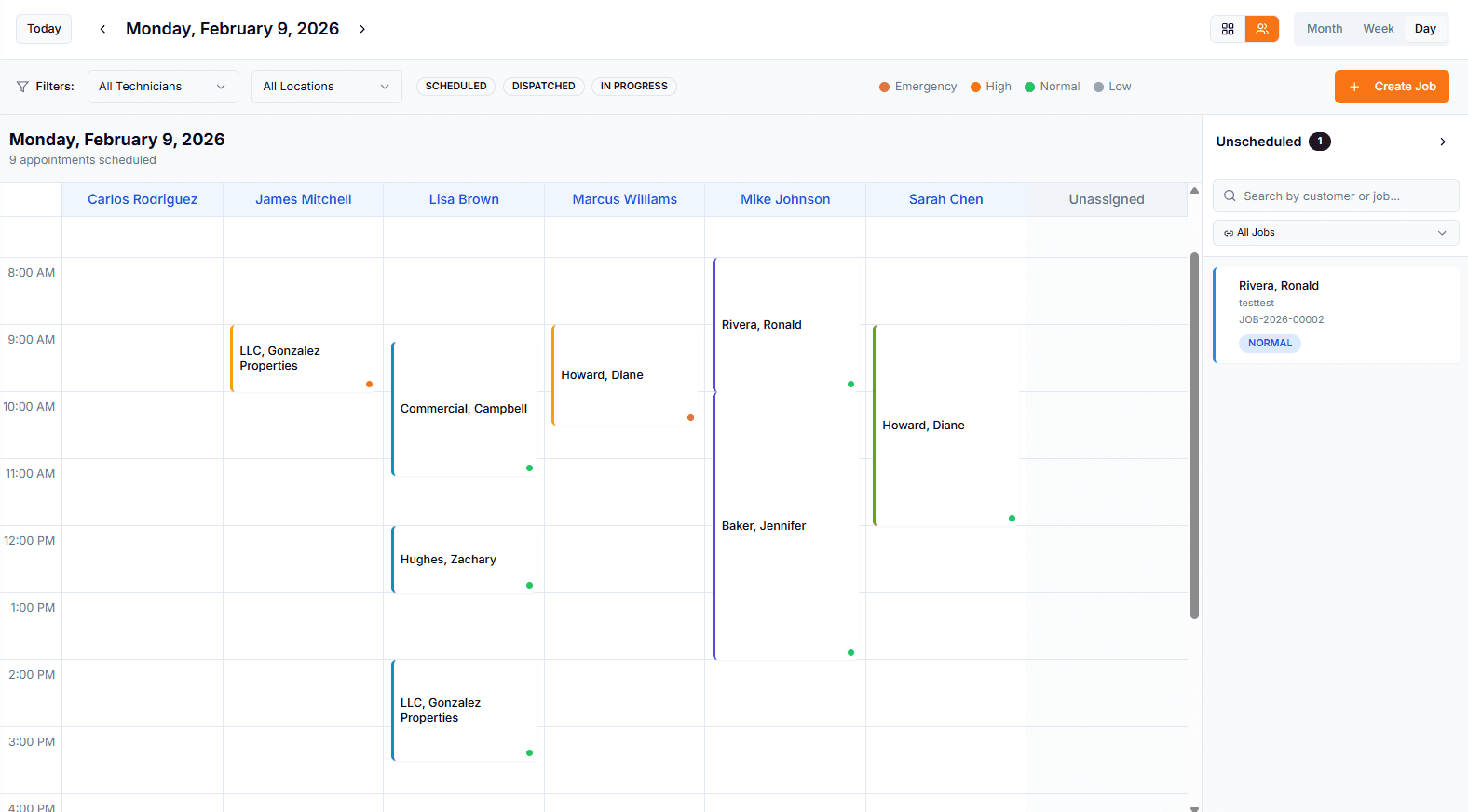
A stuck door with a car behind it is an emergency to the person on the phone. Create the job during the call, see the day’s open slots, and dispatch a technician — with statuses the office can watch from scheduled through completed.
Job created during the call
Quick-create the customer and the job while they are still on the line. Priority levels mark the true emergencies.
A day you can actually see
Day, week, and month calendar views with drag-and-drop scheduling and conflict detection — urgent calls slot in without double-booking a tech.
Statuses, not phone tag
Jobs move from scheduled to dispatched to in progress to completed. The office sees where every call stands without ringing the tech to ask.
Reminders before the visit
Customers get a text before the appointment, with consent and opt-out tracking built in (Enterprise plan). Fewer locked-gate, nobody-home trips.
Garage door business software that covers the whole operation
Scheduling, estimates, parts, and billing in one system — so the office and the trucks work from the same record.
Repair-or-replace estimates
Price book options present the spring repair, the opener replacement, and the new door side by side. The customer picks and signs online — no login required.
Truck stock that matches reality
Each truck is an inventory location. Springs, rollers, and remotes are deducted when used on a job, and purchase orders restock from your vendors.
Service-call fees up front
A phoned-in deposit request creates an invoice with a Stripe payment link — sent by branded email on every plan, or by text on the Enterprise plan.
Commercial maintenance agreements
Recurring agreements bill on one cycle and generate visits on another — quarterly tune-ups for a loading dock appear on the calendar automatically.
Warranty tracking
Install dates and warranty expirations on every door and opener, with dashboard alerts before coverage runs out.
Customer portal
Customers view their jobs, equipment, invoices, and appointments under your brand — and pay online without calling the office.
Quote the repair and the replacement in the same visit
The spring can be fixed — but the opener is fifteen years old. Pillar estimates pull from your price book with good-better-best options, so the customer sees the repair, the upgrade, and the full replacement side by side, and approves with an e-signature.
Good-better-best options
Price book items carry tiered options with feature highlights, so repair vs. replace reads as a clear choice instead of a sales pitch.
Quotes built on site
Technicians draft quotes from the catalog on their phone and convert them to formal estimates before leaving the property.
Approval without a login
Customers approve from a secure link with an e-signature — on their phone at the kitchen table or back at their desk.
Estimate to job to invoice
Approved estimates convert to jobs, and completed jobs invoice with online payment. One record from quote to cash.
Truck 2 — Stock
Inventory LocationLast Physical Count
June 2 — no variance
The right spring on the right truck
Torsion springs come in too many sizes to guess. Pillar tracks stock per location — the warehouse and each truck — deducts parts as they are used on jobs, and runs purchase orders from your vendors through receiving.
Stock per truck
Every truck is its own inventory location with assigned stock — springs, rollers, openers, remotes, hinges.
Deducted on use
Parts used on a job come out of that truck’s count automatically. No end-of-week guessing.
Purchase orders
Restock from vendors with a receiving workflow — ordered, received, counted.
Physical counts
Count sessions with variance tracking show where stock actually went.
How garage door companies use Pillar
From the first call to the warranty claim three years later, every step stays on one record.
Take the call
Create the customer and the job while they are on the phone. If you charge a service-call fee, send the payment link before the visit.
Dispatch the tech
Slot the job into the day view, conflict-checked. The tech sees it on their phone with the door’s equipment record attached.
Quote on site
Repair and replacement options from the price book, approved with an e-signature on the spot.
Invoice and record
Invoice with online payment — and the new door or opener becomes an equipment record with its warranty clock running.
Explore the features behind it
Every garage door workflow connects to the broader Pillar platform. Dig into the features that matter most to your business.
Equipment Tracking
Doors and openers with warranty and history
Scheduling
Drag-and-drop calendar with conflict detection
Estimates & Quoting
Tiered options with online approval
Invoicing & Payments
Online payments and configurable terms
Service Agreements
Recurring plans with decoupled billing
Price Book
Catalog with good-better-best options
Customer Portal
Self-service dashboard for your customers
Jobs & Work Orders
Statuses, priorities, and full job records
Frequently asked questions
- Can Pillar track the doors and openers I install?
- Yes. Each door and opener becomes an equipment record on the customer account with manufacturer, model, serial number, install date, warranty expiration, and a full service history showing every repair, tune-up, and inspection. Price book items can create the equipment record automatically when an install job completes, and the dashboard alerts you before warranties expire.
- How does Pillar handle same-day repair calls?
- You create the customer and the job while the caller is still on the phone, mark the priority (up to Emergency), and place it on the day-view calendar — which flags conflicts before you double-book a technician. The job then moves through statuses from scheduled to dispatched to in progress to completed, so the office always knows where each call stands.
- Can I collect a service-call fee before the visit?
- Yes. A deposit request creates an invoice with a Stripe payment link the customer can pay before the technician heads out. The link is sent by branded email on every plan; text message delivery requires the Enterprise plan with texting set up. Appointment types can carry a default service-call fee so the office does not re-type it on every call, and you are notified the moment it is paid.
- How much does garage door software cost?
- Pillar Pro is $99/month and Enterprise is $199/month, each including one user, with additional users at $49 and $69 per month respectively. Annual billing saves roughly 20%. Every new account starts with a 14-day free trial of the Enterprise plan, and there are no setup fees or long-term contracts.
- Does Pillar measure, design, or configure garage doors?
- No. Pillar is not a door configurator or measuring tool — it runs the business side: scheduling, customers, estimates, invoicing, equipment records, and parts stock. Technicians can attach photos and notes (including measurements) to the job, and your price book holds the doors, openers, and parts you actually sell, with per-square-foot pricing supported where you price by door size.
Everything a garage door company runs on
Equipment Tracking
Every door and opener with serial, install date, and warranty.
Learn moreScheduling & Dispatch
Same-day repair calls dispatched without double-booking.
Learn moreEstimates & Quoting
Repair-or-replace options with e-signature approval.
Learn morePrice Book
Springs, openers, and doors priced once, quoted consistently.
Learn moreInvoicing & Payments
Invoice on site and take card payment via Stripe.
Learn moreService Agreements
Commercial maintenance contracts billed on their own cycle.
Learn moreCustomer Portal
Customers approve quotes and pay online.
Learn morePillar vs Workiz
See how Pillar compares for garage door companies.
Learn moreSee how Pillar works for garage door companies
Walk through same-day scheduling, repair-or-replace estimates, and door and opener records with your own price book. No generic demo — your workflow on the screen.