Pool service software built for the weekly rhythm
Weekly cleanings that repeat all season. Monthly billing that runs on its own. Openings, closings, and repairs in between. Pillar handles the schedule, the paperwork, and the proof of service so you can run more pools without more office time.
Pool service runs on repetition. Most software fights it.
Generic field service tools are built around one-off repair tickets. A pool company lives on weekly maintenance accounts, flat monthly billing, and two seasonal scheduling crunches a year. Pillar is built for that pattern.
Dozens of weekly stops to keep straight
A hundred pools on weekly or bi-weekly service means thousands of visits a season. Tracking them in a spreadsheet guarantees missed pools and angry calls.
Billing that does not match the visits
Customers pay one flat monthly rate, but the work happens weekly. Software that ties billing to each visit forces workarounds or manual invoicing.
The spring and fall crunch
Every account wants opened in the same three weeks of spring and closed in the same three weeks of fall. Two scheduling fire drills a year, every year.
No proof the pool was serviced
Without documented readings, chemical notes, and photos per visit, "the water turned green" disputes come down to your word against the customer's.
Bill monthly. Visit weekly. Pillar keeps them separate.
Most pool accounts pay one flat monthly rate for weekly service. In Pillar, a service agreement's billing cycle is decoupled from its job frequency — so the invoice goes out monthly while the visits generate weekly, automatically.
Billing cycle decoupled from visit frequency
Set the agreement to bill monthly while jobs generate weekly or bi-weekly. The two run on separate schedules, the way pool plans actually work.
Visits generate automatically
Recurring jobs are created from the agreement on schedule. Nobody re-enters next week's cleanings — they are already on the calendar.
Automated recurring billing through Stripe
Agreements can bill automatically via Stripe subscriptions, so the monthly charge goes out without anyone touching an invoice.
Recurring revenue at a glance
See monthly recurring revenue across your active agreements, so you know what your account book is actually worth.
Prove every pool was actually serviced
“Did your guy even show up?” ends here. Every appointment carries an interactive checklist where technicians document water test readings, chemical additions, and condition notes — with photos and timestamps to back it up.
Interactive visit checklists
Every appointment carries a checklist — skim, brush, empty baskets, test water, log readings. Techs check items off as they work the pool.
Document readings in the checklist
Record chlorine, pH, and alkalinity readings as comments on checklist items. They are saved with a timestamp and the tech's name.
Photo requirements per item
Mark checklist items as photo-required. A tech cannot call the visit done without the photo that proves the work.
Before and after photos
Attach pre-work and post-work photos to any job. A green-to-clean recovery is a lot easier to bill when you can show both sides.
Comments with role badges
Techs, dispatchers, and owners can comment on checklist items. Every note shows who said it and what their role is.
Reusable visit templates
Build appointment templates for weekly service, filter cleans, openings, and closings. Every visit of that type starts with the same checklist.
Survive the opening and closing crunch
Twice a year, every customer needs you in the same few weeks. Schedule openings and closings as jobs with their own appointment templates and checklists, see the whole backlog in one filtered list, and watch conflict detection catch double-bookings before they happen.
Spring Openings
Cover removal, startup, equipment checks, first balance
Summer Weekly Service
Cleanings, water testing, chemical maintenance
Fall Closings
Winterization, line blowouts, cover installs
Off-Season Work
Equipment repairs, replacements, renovations
Know every pump, heater, and filter on your accounts
When a customer calls about a noisy pump, you should already know the model, when it was installed, and whether the warranty still covers it. Pillar keeps an equipment record on every customer, with full service history per unit.
Manufacturer, model, and serial number
Record pumps, heaters, filters, salt cells, and automation systems per customer with installation dates.
Warranty expiration alerts
Warranty dates are tracked per unit, and expiring warranties surface on your dashboard before they lapse.
Service history per unit
Every repair, inspection, and replacement is logged against the specific piece of equipment, not just the customer.
Auto-created from installs
Price book items can create equipment records automatically when an install job completes — sell a pump, get the record.
Pool owners check the portal instead of calling you
Customers get a branded self-service portal where they can see visit history, view their equipment and its service records, approve estimates for repairs, and pay invoices online through Stripe. Fewer status calls, faster payments.
Flat-rate pricing for plans, clean quotes for repairs
Build your service plans, filter cleans, and repair work into a flat-rate price book. When a tech spots a failing pump on a weekly visit, the quote comes from the same catalog — priced consistently every time.
Build the Quote
Pull the repair or plan from your flat-rate price book. Same item, same price, every time.
Customer Approves
Send a tokenized link. Customers approve with an e-signature, no login required.
Convert to Job
Approved estimates convert to jobs with one click and slot into the schedule.
Invoice & Collect
Invoice from completed work. Customers pay online via Stripe or by check.
Everything a pool tech needs, on the phone in their pocket
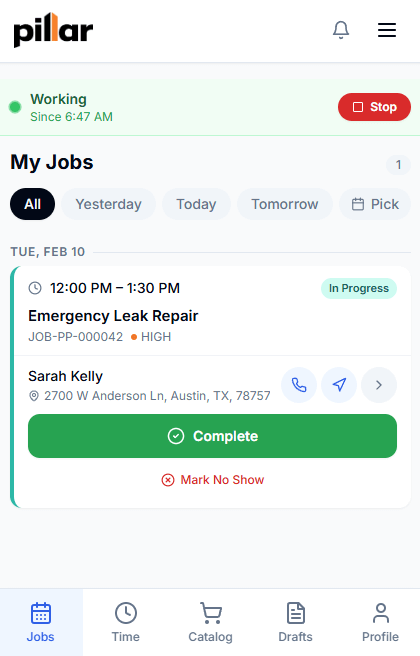
Pillar installs as a Progressive Web App — no app store, no separate download to manage. Techs open their day's job list, work the visit checklist poolside, snap photos, and clock in and out per job.
My Jobs at a glance
Techs see their assigned visits for the day with status, customer, and address details.
Checklists worked poolside
Check off items, add reading comments, and attach photos from the phone, at the pool.
Clock in and out per job
Labor time is recorded per visit, so you know what each account actually costs to service.
Quote repairs on-site
Techs can draft quotes from the price book at the pool and send them on for approval.
Everything a pool service company needs
Pillar connects recurring schedules, visit documentation, equipment records, and billing in one platform.
Service Agreements
Bill monthly, visit weekly
Recurring Jobs
Automated repeat visits
Scheduling
Drag-and-drop calendar
Equipment Tracking
Pumps, heaters, warranties
Customer Portal
Self-service for pool owners
Estimates
Quotes with e-signature
Invoicing & Payments
Stripe online payments
Mobile (PWA)
Field app, no app store
Frequently asked questions
- How much does pool service software cost?
- Pillar Pro is $99/month and includes one user, with additional users at $49/month each. The Enterprise plan is $199/month with additional users at $69/month, and adds features like projects, contracts, and API access. Every new account starts with a 14-day free trial on the full Enterprise feature set, there are no setup fees, and there is no long-term contract.
- Can I bill customers monthly while servicing their pool weekly?
- Yes. In Pillar, a service agreement's billing cycle is separate from its job frequency. You can set an account to bill a flat monthly rate while visits generate weekly or bi-weekly, and the monthly charge can run automatically through Stripe.
- How do technicians record water test readings?
- Each appointment has an interactive checklist. Technicians check off the work as they go and record readings like chlorine, pH, and alkalinity as comments on checklist items, with timestamps and the technician's name saved automatically. Checklist items can also require photos, and before-and-after photos can be attached to any job. Pillar is not a chemistry calculator — it is where the readings and proof of service live.
- Does Pillar handle seasonal pool openings and closings?
- Yes. Openings and closings are scheduled as jobs with their own appointment templates and checklists, so every opening follows the same steps. The calendar shows the whole backlog with drag-and-drop rescheduling, and conflict detection flags double-booked technicians before you save.
- Can pool owners see their visit history and pay online?
- Yes. Customers get a self-service portal branded to your company where they can view their jobs and visit history, see their equipment and its service records, approve repair estimates with an e-signature, and pay invoices online through Stripe.
Everything a pool service company runs on
Recurring Jobs
Weekly cleanings created automatically.
Learn moreService Agreements
Bill monthly while visiting weekly.
Learn moreEquipment Tracking
Pumps, heaters, and filters with warranty dates.
Learn moreScheduling & Dispatch
Seasonal openings and closings without double-booking.
Learn morePrice Book
Flat-rate plans and repair pricing in one catalog.
Learn moreCustomer Portal
Visit history and online payment for pool owners.
Learn moreMobile (PWA)
Poolside checklists and photos from any phone.
Learn morePillar vs Jobber
See how Pillar compares for pool service companies.
Learn moreSee Pillar with your pool accounts in mind
Schedule a demo and we will walk through weekly maintenance agreements, visit checklists, and seasonal scheduling using your actual service mix.