CompareFieldEdge
Equipment records with warranty dates, maintenance agreements that book their own visits, and two-way QuickBooks sync. All of it on every account, including the free one.
No credit card. No contract.
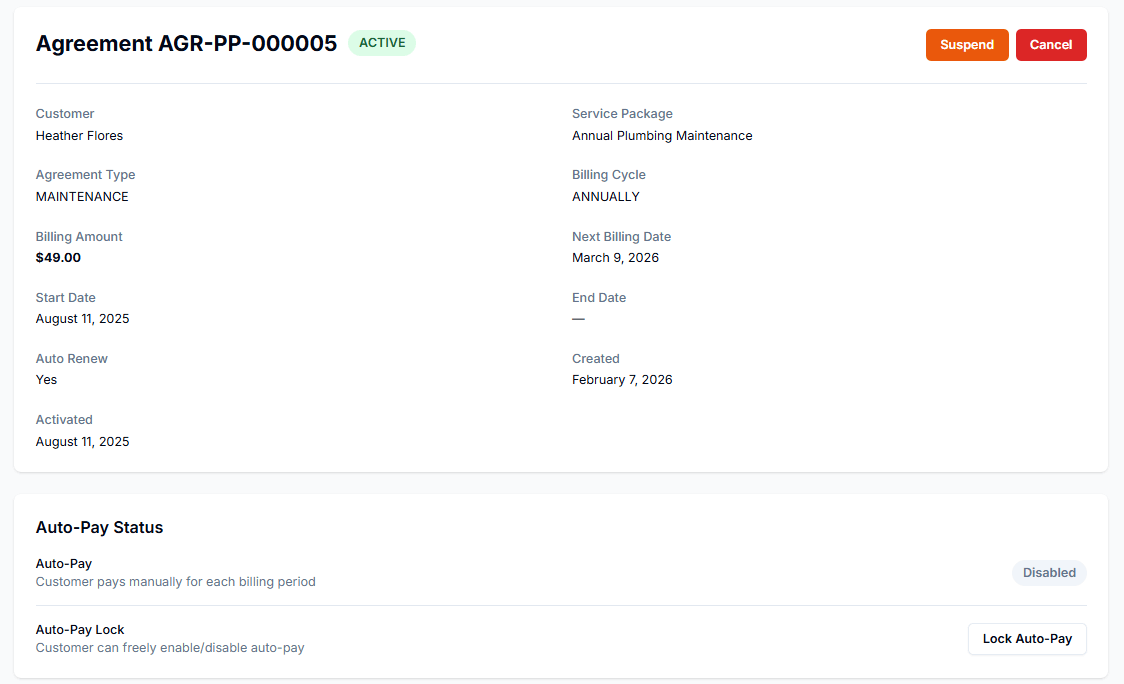
FieldEdge has deep roots in HVAC and plumbing. Pillar puts the same equipment records and maintenance agreements on a free account.
Plumbing shops run on the same three. All of them are on every account, the free one included.
Every unit gets its own record with make, model, serial, install date, and warranty expiry. Its service history follows the unit, not the job.
A maintenance agreement creates its visits on schedule and bills on its own cycle, with auto renew and auto-pay if you want them.
Two-way QuickBooks sync keeps customers, invoices, and payments lined up, on every account and at no extra cost.
One column is verified against what we charge. The other is yours to fill in, because FieldEdge's prices are theirs to publish.
Swipe across for the write-in column.
| Line item | Pillar | FieldEdgewrite in yours |
|---|---|---|
| Price to start | $0. One person, forever, no card. | What you pay this month |
| Each additional person | $39 a month for their login. Yours stays free. | What the next person costs you |
| Features behind a higher plan | None. Every feature is on for every account. | What you would pay to add the ones you want |
| Texting and calling | Prepaid credit at the carrier rates plus a markup. Every rate is printed on the pricing page. | What numbers and messages add to your bill |
| Limits while you are one person | 100 jobs, 100 estimates, and 100 invoices a month. The cap lifts on the second seat. | Your limits today |
| Customers you can hold | Unlimited, on every account. | Your contact limit |
| File storage | At least 25 GB, plus 25 GB for every paid person. | Your storage allowance |
| Contract | None. Month to month, cancel anytime. | Your renewal date and notice period |
| Setup fee | $0. Importing your data is free too. | What it cost you to start |
| Getting your data out | Everything exports to a spreadsheet, from every account. | Check before you need it |
Payments taken through Pillar carry Stripe’s standard processing fees on your own Stripe account, plus 1% to Pillar. Cash and checks cost nothing.
We do not print other companies’ numbers, because they change without notice. Every number in our column is verified against what we charge.
All four answers are on the bill in your inbox. Ours are in the table above and the note under it, already filled in.
Export from FieldEdge, upload the file, and the FieldEdge preset maps the fields for you. Everything else comes in from a CSV or Excel export on the same screen.
Anything you keep in a CSV or Excel file uploads the same way, on the same screen, 100,000 rows a file.
Estimates and your price book upload as spreadsheets on the same screen. Equipment records land ready to use, warranty dates and all.
Also imports from ServiceTitan, Housecall Pro, Jobber, ServiceM8, Workiz, Square, or any CSV or Excel spreadsheet.
Customers, jobs, and invoices come across with their history. The rest uploads as a spreadsheet.
One click rolls the whole import back. Start over clean.
Nothing. Importing is free, up to 100,000 rows a file.
Everything exports to a spreadsheet, anytime, from every account.
Yes. Scheduling, dispatch, estimates, invoicing, equipment records with warranty dates, and maintenance agreements are on every account, the free one included.
Yes, both ways, on every account and at no extra cost. Customers, invoices, and payments stay matched with your books.
The preset maps customers, job history, invoices, equipment records, and service agreements. Estimates and your price book upload as spreadsheets on the same screen, free either way.
Yes. An agreement runs on its own billing cycle, renews if you set it to, and the customer can be put on auto-pay.
$0 for one person and $39 a month for each additional person who needs a login. No setup fee and no contract.
More pricing questions? Read the pricing FAQ → Or ask us something else.
Start free, import your equipment records, and watch the agreements book their own visits.
No card. No contract. No sales call.