Pest control software built around the recurring visit
Quarterly treatment schedules, service agreements that bill on their own cycle, and per-visit checklists with photo proof. Built for residential and commercial pest control operators running general pest, termite, and seasonal programs.
The problems pest control companies know too well
A pest control business runs on hundreds of small recurring commitments. When those live in spreadsheets and memory, accounts quietly fall behind.
Quarterly accounts slip
A quarterly visit that gets missed is a customer you might not hear from again until they cancel. Tracking hundreds of due dates by hand does not scale.
Spring surge chaos
When ant and mosquito season hits, the schedule fills fast. Without conflict detection, double-bookings and overloaded days follow.
No proof of service
When a customer asks what was actually done last visit, "the tech was there" is not an answer. You need the checklist and the photos.
Station records on paper
Termite bait stations installed years ago live on index cards and in one technician’s memory. When that tech leaves, the history leaves too.
Billing out of sync with the plan
Monthly-billed plans with quarterly visits mean the invoice schedule and the service schedule never line up. Reconciling them by hand invites mistakes.
"When is my next treatment?"
Every customer who calls to ask about their next visit, their last invoice, or a reschedule pulls your office off real work.
Bill monthly, treat quarterly — without spreadsheet math
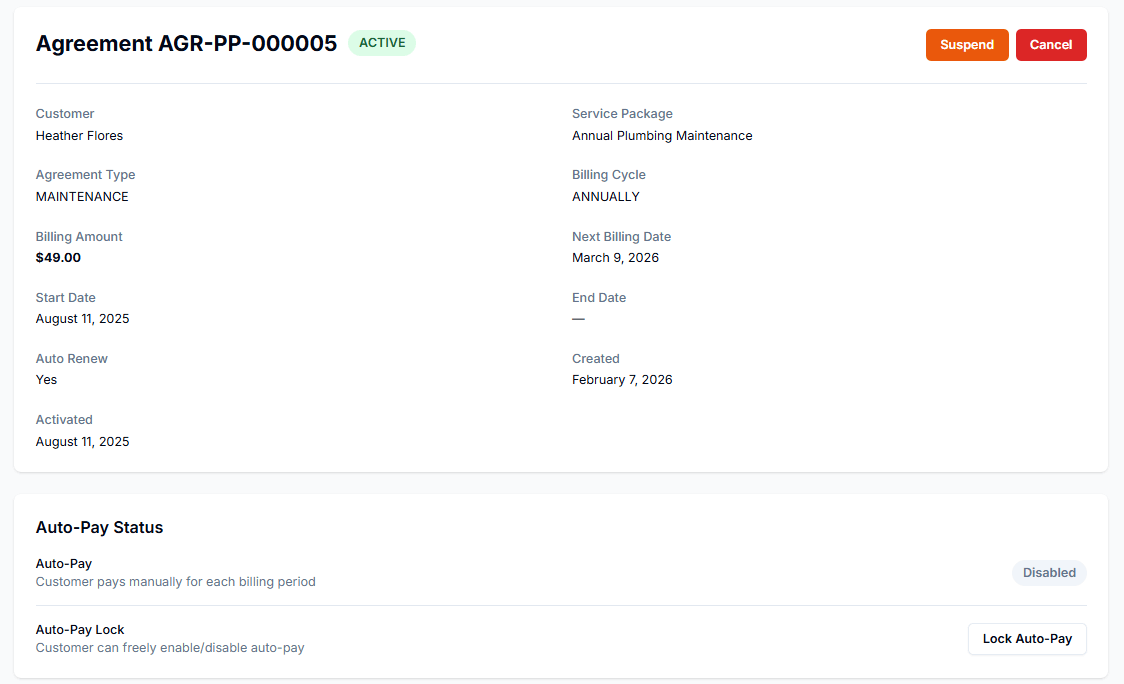
Most pest control plans bill on one rhythm and service on another. Pillar service agreements keep the two separate: set the billing cycle for the money and the job frequency for the visits, and the system generates each treatment on schedule.
Visit frequency, set per plan
Monthly, bi-weekly, quarterly, semi-annual, or annual job frequency on each service agreement. The right cadence for general pest, mosquito, or termite monitoring.
Billing on its own cycle
Bill monthly, quarterly, semi-annually, or annually through Stripe — independent of how often you visit. Auto-renewal supported.
Jobs created automatically
Treatments appear on the calendar from the recurrence rule, with configurable lead time so the office can review assignments first.
Seasonal start and end dates
Recurring schedules support an optional end date, so a March-to-October mosquito program stops generating jobs when the season ends.
Treatment Checklist
Quarterly General PestProgress
5 / 8 completed
Completed By
Derek T. -- 10:48 AM
Every visit follows the same protocol
Build a checklist for each service type — quarterly general pest, termite inspection, rodent exclusion — and attach it to every appointment. Technicians work through it on their phone, and the office sees progress without a single phone call.
Templates per service type
Build one checklist per program — quarterly general pest, termite inspection, rodent exclusion — and it attaches to every appointment of that type.
Photo requirements on key steps
Flag steps that require a photo before they can be marked complete. Entry points, activity evidence, and station conditions get documented every time.
Real-time progress from the office
Dispatchers see checklist completion as it happens — no calling the tech to ask whether the perimeter got treated.
Comments per step
Technicians leave notes on individual items: new activity found, access problems, recommendations for the next visit.
Pest control business software that covers the whole operation
Scheduling, agreements, documentation, and billing in one system — so the office and the field work from the same record.
Scheduling with conflict detection
Month, week, and day calendar views with drag-and-drop rescheduling. The system flags overlapping appointments before they become a problem on a packed spring day.
Service agreements
Recurring plans with decoupled billing and visit frequency, auto-renewal, and Stripe-automated recurring billing. MRR tracking shows what your plan base is worth.
Good-better-best treatment plans
Price book items support tiered pricing options with feature highlights, so a quote can present a basic, standard, and premium program side by side.
Photo documentation
Before-and-after photos attach to the job — entry points, infestation evidence, completed work. The record stays with the customer, not on a tech’s phone.
Station and system tracking
Installed bait stations and systems tracked as equipment records with install dates, warranty windows, and full service history per unit.
SMS appointment reminders
Customers get a text before the visit, with opt-out and consent tracking built in. Fewer locked gates and not-home no-shows.
A record for every bait station you put in the ground
Termite bait stations, monitoring stations, and exclusion installs are long-lived assets at the customer's property. Pillar tracks each one as an equipment record — so the next technician knows what is installed, where, and when it was last checked.
Per-unit records
Manufacturer, model, serial number, install date, and notes on every station or system.
Service history
Every inspection and service logged per unit — what was done, by whom, and what was found.
Warranty tracking
Warranty expiration dates with dashboard alerts before coverage runs out.
Auto-created from the price book
Selling a station install can create the equipment record automatically when the job completes.
How pest control companies use Pillar
From the first inspection to years of recurring service, every step stays on one record.
Quote the program
Send an estimate with tiered plan options. The customer reviews and approves online with an e-signature — no login required.
Set the schedule
Create the service agreement with its billing cycle and visit frequency. Treatments generate on the calendar automatically.
Treat and document
The technician follows the checklist on their phone, takes required photos, and logs station service before leaving the property.
Bill on your cycle
Agreement billing runs through Stripe on its own schedule. One-off jobs invoice directly, and customers pay online.
Customers see their treatment history without calling you
“When was my last service?” and “When is the next one?” are answered in the portal, not on your office line. Customers log in under your brand to view visits, pay invoices, and request schedule changes.
Visit and service history
Customers see past jobs and upcoming appointments, including service history on installed stations and systems.
Online payments
Invoices paid through Stripe with saved payment methods. Plan customers never chase a paper bill.
Reschedule requests
Customers submit up to three preferred dates when they need to move a visit. You approve from your end.
Your brand throughout
Your logo, your colors, your subdomain. The portal looks like your company, not a third-party tool.
Explore the features behind it
Every pest control workflow connects to the broader Pillar platform. Dig into the features that matter most to your business.
Recurring Jobs
Automated scheduling patterns for repeat treatments
Service Agreements
Recurring plans with decoupled billing
Scheduling
Drag-and-drop calendar with conflict detection
Customer Portal
Self-service dashboard for your customers
Equipment Tracking
Stations and systems with service history
Estimates & Quoting
Tiered plan options with online approval
Invoicing & Payments
Online payments and configurable terms
Technicians
Skills, schedules, and team management
Frequently asked questions
- Does Pillar handle quarterly pest control schedules?
- Yes. Service agreements support quarterly, monthly, bi-weekly, semi-annual, and annual visit frequencies, and recurring jobs generate on the calendar automatically from the schedule you set. Seasonal programs can have an end date, so a spring-to-fall mosquito plan stops generating visits when the season is over.
- Can I bill monthly but service quarterly?
- Yes. Pillar separates the billing cycle from the visit frequency on every service agreement. A plan can bill monthly through Stripe while generating one treatment visit per quarter — no spreadsheet reconciliation between the invoice schedule and the service schedule.
- Can customers see their treatment history?
- Yes. The customer portal shows past jobs, upcoming appointments, invoices, and service history on installed equipment like bait stations. Customers can also pay invoices online and submit reschedule requests, all under your company branding.
- How much does pest control software cost?
- Pillar Pro is $99/month and Enterprise is $199/month, each including one user, with additional users at $49 and $69 per month respectively. Annual billing saves roughly 20%. Every new account starts with a 14-day free trial of the Enterprise plan, and there are no setup fees or long-term contracts.
- Can I track termite bait stations in Pillar?
- Yes. Each station or installed system becomes an equipment record on the customer account, with manufacturer, model, serial number, install date, warranty expiration, and a full service history showing every inspection and what was found. Price book items can even create the equipment record automatically when an install job completes.
Everything a pest control company runs on
Service Agreements
Quarterly treatment plans billed on their own cycle.
Learn moreRecurring Jobs
Treatment visits created automatically on schedule.
Learn moreScheduling & Dispatch
Spring-surge scheduling with conflict detection.
Learn moreEquipment Tracking
Bait stations and installed systems on every account.
Learn moreEstimates & Quoting
Good-better-best treatment plans with signatures.
Learn moreCustomer Portal
Treatment history and online payment for customers.
Learn moreInvoicing & Payments
Automatic billing for recurring accounts.
Learn morePillar vs Workiz
See how Pillar compares for pest control companies.
Learn moreSee how Pillar works for pest control companies
Walk through quarterly schedules, service agreements, and treatment checklists with your actual service plans. No generic demo -- your workflow on the screen.